Operator Mappings
The Operator Mappings allow you to bind standard Blender commands to chord sequences.
Adding Operators
See Adding Mappings for general methods. For operators specifically:
- Preferences: Manually add and edit operator mappings in the Chord Song tab.
- Context Menu: Right-click any button or menu item in Blender and select Add Chord Mapping.
- Info Panel: Select operator history rows in Blender's Info Editor, right-click, and select Extract to Chord Mapping for batch creation.
- JSON File: Manually edit the
chordsong.jsonfile. You can open its location by Alt+Clicking the folder icon next to the path in preferences.
Operator Mapping Attributes
- Operator: The path after with
bpy.ops(e.g.,mesh.subdivide). - Parameters: A Python-style keyword argument (e.g.,
number_cuts=2). - Call Context:
Execruns the command immediately;Invokemay open a secondary UI or tool-setting popup.
Chaining Multiple Operators
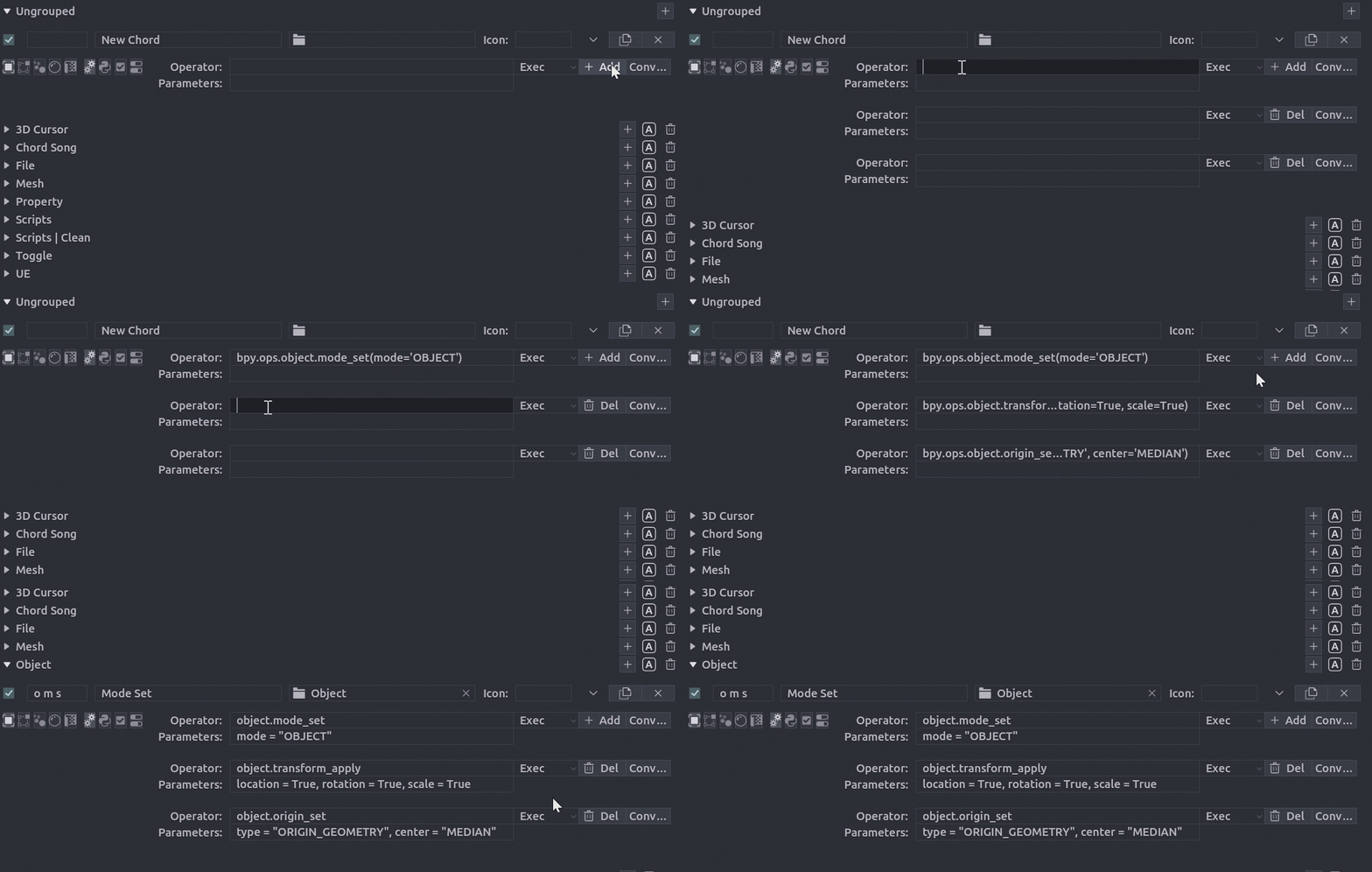
Chord Song allows you to execute a sequence of operators with a single chord. This is ideal for complex macros (e.g., "Duplicate > Move > Rename").
Setting up a Chain
- Set the Mapping Type to Operator.
- Use the + Add button next to the operator field to add Sub-Operators.
- If using full operator path, press the Convert button to automatically fill the operator and parameters fields.
# Example of a chained execution flow:
# 1. Set the object to Object Mode
# 2. Apply the transform
# 3. Set the origin to the geometry center

# Can be copied from the Info panel or any other source.
bpy.ops.object.mode_set(mode='OBJECT')
bpy.ops.object.transform_apply(location=True, rotation=True, scale=True)
bpy.ops.object.origin_set(type='ORIGIN_GEOMETRY', center='MEDIAN')