Property Mappings
Property Mappings allow you to set a Blender property to a specific value using chords (e.g., set space_data.shading.type to 'SOLID').
Unlike Toggle Mappings, property mappings set a fixed value rather than flipping a boolean state.
Adding Properties
- Preferences: Manually add and edit property mappings in the Chord Song tab.
- Context Menu: Right-click any property field (checkboxes, sliders, dropdowns) and select Add Chord Mapping.
- Info Panel: Extract property assignments from Blender's history for batch creation.
Chaining Multiple Properties
You can bind multiple properties to a single chord to create "Presets" (e.g., one chord that sets Camera FOV, Clip Start, and Clip End at once).
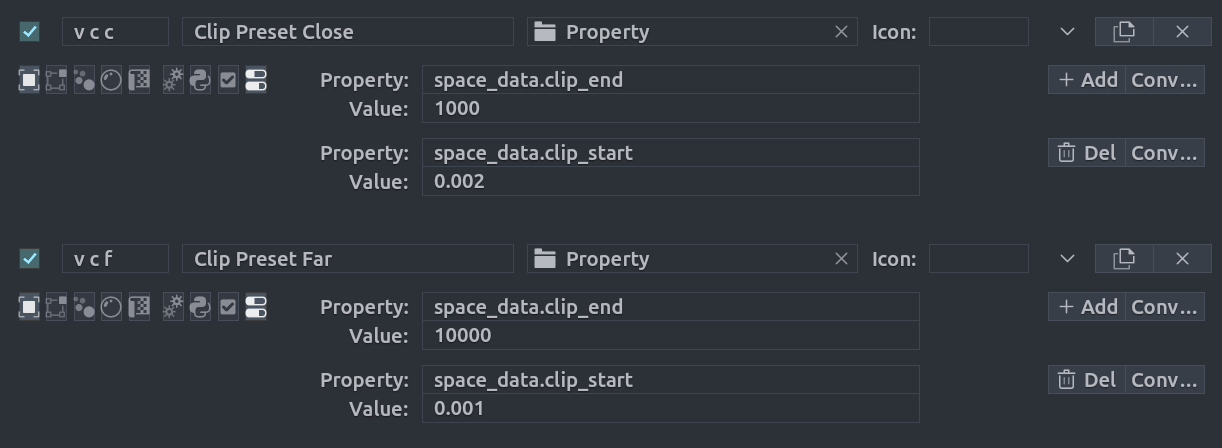
Configuration Properties
- Property: The internal path to the property (e.g.,
space_data.shading.type). - Value: The specific value to set (e.g.,
0.5,'SOLID', or'WIREFRAME'). - Sub-Items: Use the + button to add additional properties to the same chord.