Conflict Detection
Identify and resolve chord mapping conflicts.
Types of Conflicts
Prefix Conflicts
Occurs when one chord sequence is a prefix of another.
Example:
- Mapping A:
g(Frame Selected) - Mapping B:
g g(Frame All)
Pressing g triggers Mapping A immediately, making Mapping B unreachable.
Duplicate Mappings
The same key sequence assigned to multiple actions in the same Context.
Example:
- Mapping A:
f r→ "Reset Factory Settings" - Mapping B:
f r→ "Recover Autosave"
Only the first mapping executes, leading to unpredictable behavior.
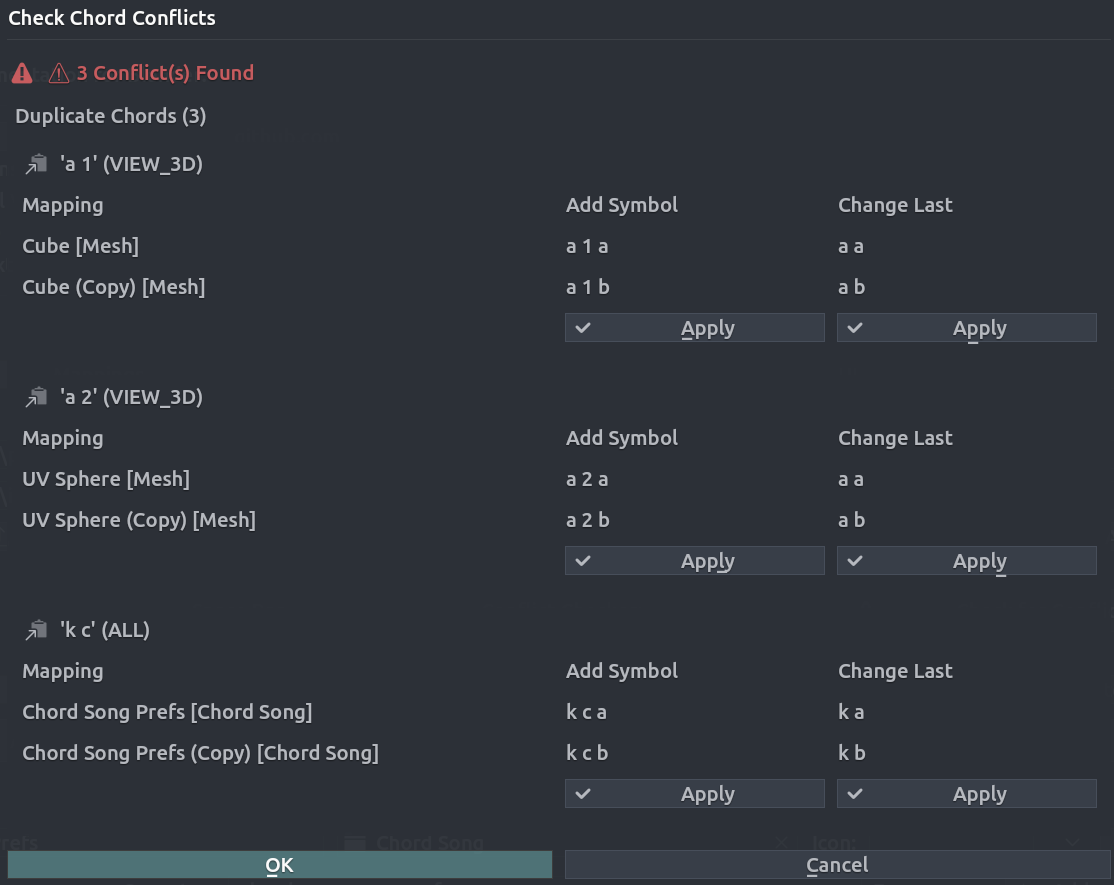
Checking for Conflicts
- Open Chord Song preferences.
- Click Check Conflicts (or run
chordsong.check_conflicts). - Review the dialog and System Console report.

Resolving Conflicts
Manual Modification
Edit the "Chord" field of one conflicting mapping to a unique sequence.
Automatic Fixes
The Conflict Checker suggests fixes:
| Strategy | Description |
|---|---|
| Add Symbol | Appends a unique letter or number (e.g., g → g a). |
| Change Last | Swaps the final key (e.g., g g → g f). |
Suggestion Algorithm
When generating a fix, it will:
- Filter keys that would create new conflicts.
- Prefer single-character additions.
- Ensure unique recommendations for multiple duplicates.