Adding Chords from Info Panel
Create chord mappings from Blender's operator history.
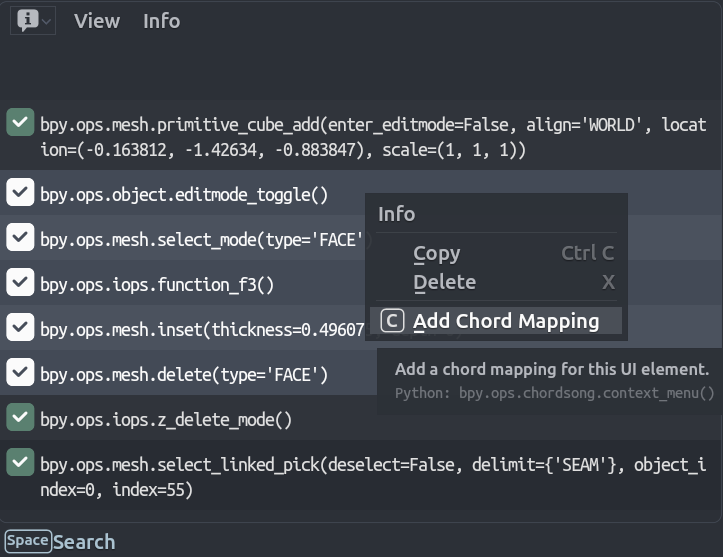
Workflow
Step 1: Perform Actions
Execute operators or change properties. Each action appears in the Info panel:
Operators:
bpy.ops.mesh.primitive_cube_add()
bpy.ops.object.shade_smooth()
bpy.ops.transform.translate(value=(1, 0, 0))
Properties:
bpy.context.scene.cycles.use_denoising = True
bpy.context.space_data.overlay.show_wireframes = False
Step 2: Select Text in Info Panel
- Select one or more lines in the Info panel.
- Right-click and choose "Add Chord Mapping".
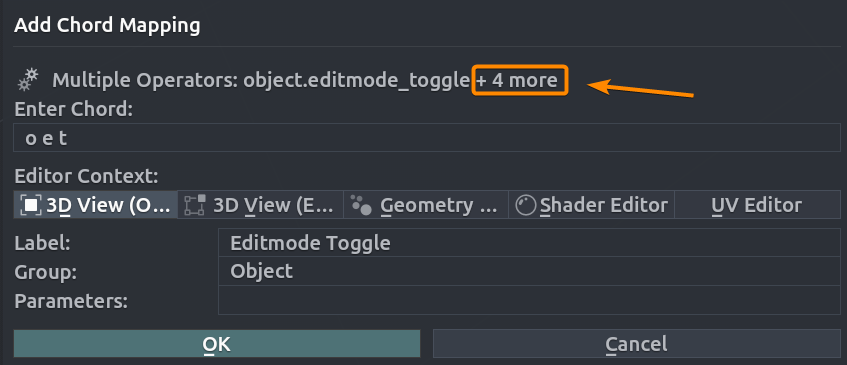
Step 3: Configure the Mapping
- Enter Chord: The sequence of keys that will trigger the mapping.
- Editor Context: Context in which the mapping will be active.
- Label: Chord name.
- Group: Chord group.
- Parameters: Operator parameters.
Enter your chord sequence and adjust settings as needed.
Batch Creation
Selecting multiple lines extracts all operators or properties. The first becomes the primary mapping; others are stored as sub-items. If a mix of operators and properties is detected, whichever type is detected first will filter out the other type, i.e. if the first line is an operator, the properties/toggles will be ignored and vice versa.