Home
Chord Song is an efficiency-focused Blender add-on that introduces <Leader> key functionality and chord-based mappings. Inspired by Neovim addon which-key.nvim, it allows you to trigger operators, execute custom Python scripts, and modify properties using short, memorable key sequences known as chords.
Why Chords?
Traditional hotkey systems suffer from "keybind exhaustion," where users must memorize awkward combinations like Ctrl+Alt+Shift+F12. Chord Song solves this by:
- Reducing cognitive load: Use intuitive sequences (e.g.,
m cfor Mesh > Cube). - Conserving hotkey real estate: A single leader key (e.g.,
Space) opens up dozens of unique combinations. - Providing visual feedback: The dynamic overlay shows available options as you type, eliminating the need for perfect memory.
Key Features
- Context Menu Integration: Right-click any Blender UI element to instantly add it to your chord library. Works with operators, properties, toggles, and Info panel history.
- Leader Key System: Initiate actions with a
<Leader>key (default:Space). - Context Awareness: Mappings dynamically filter based on your active editor (e.g., 3D View, UV, Shader Editor).
- Smart Recents: Double-tap the leader key to access your most recent actions.
- Scripts Overlay: Quick access to custom Python scripts with fuzzy search and numbered execution (default:
<Leader> x). - Mapping System: Bind chords to Operators, Properties, Toggles, or external Python files.
- Manual Sorting: Organize chords with move up/down buttons or alphabetically sort entire groups. The overlay respects your custom order.
- Copy & Paste Sharing: Share chord snippets with others via clipboard using compact JSON format.
Quick Start Guide
To get started with Chord Song, follow these steps:
1. Project Prerequisites (Required for Icons)
Chord Song uses Nerd Font icons to provide visual cues in the overlay. Without this, icons will appear as missing character boxes.
Installation Steps:
- Download a Nerd Font (e.g., Ubuntu Nerd Font).
- Install the font on your operating system.
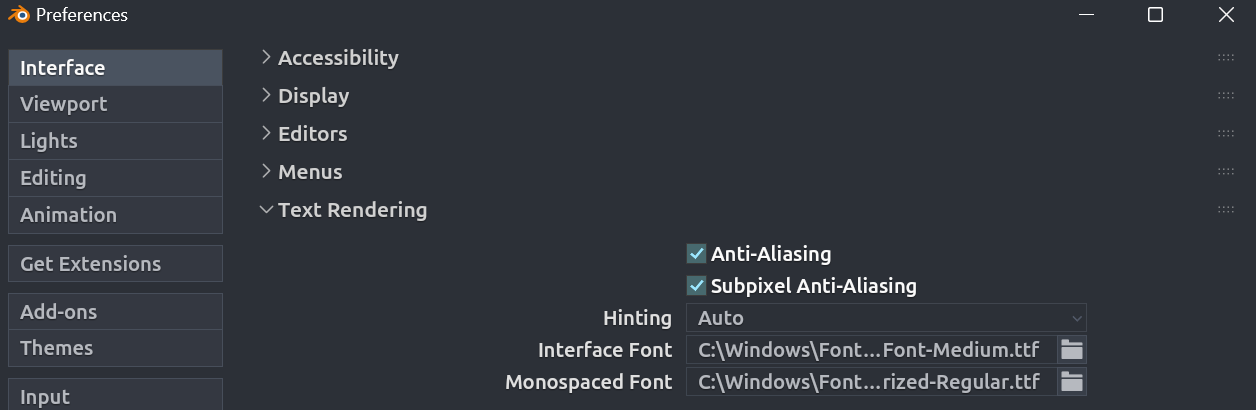
- In Blender, navigate to Edit > Preferences > Interface > Text Rendering.
- Set the Interface Font to your installed Nerd Font.
2. Download the Add-on
Choose your preferred platform to download the latest .zip release:
3. Installation
- In Blender go to Edit > Preferences > Extensions.
- Click Install... and select the downloaded
.zipfile. - Search for "Chord Song" and ensure the checkbox is enabled.
After installation, proceed to the Chord Mappings to define your first sequence.
Security & Safety
Python Script Execution:
Chord Song allows for the execution of arbitrary Python scripts via chord mappings.
- Safeguard Enabled: Script execution is disabled by default. You must explicitly enable "Allow Custom User Scripts" in Preferences before script mappings will work.
- Identify Your Scripts: Only map chords to
.pyfiles you have written or audited. - Permission Boundary: The add-on executes scripts within the standard Blender Python environment.
Always review the source code of any script before adding it to your library. See Script Mappings for details on enabling script execution.