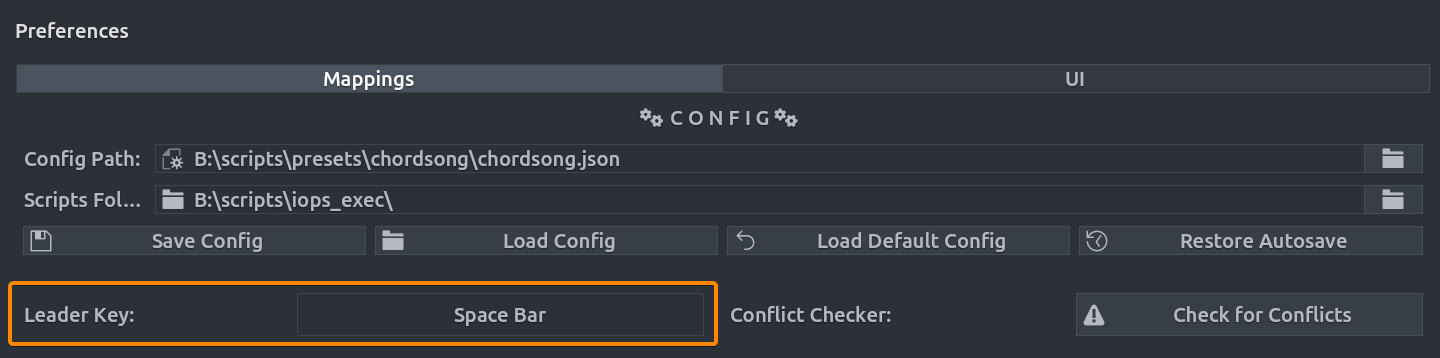
Leader Key
The Leader Key is the prefix that activates Chord Song's listening mode. Instead of using complex Ctrl+Alt combinations, you press a single prefix key (default: Space) to begin a chord sequence.
Key Interception
When a key is set as the Leader Key, you can no longer use it as the first chord. e.g., if you set Q you can no longer use it to start a chord like Q M. But it can still be used as second or third token in a chord e.g. M Q.
Conflict Prevention
If you use Space as your leader key, make sure to disable Blender's default mapping for Play/Search, or rebind the leader to a less critical key like /, Q, or F1.
Interaction Model
By default, the leader key supports a multi-tap system:
- Single Tap: Opens the overlay and starts listening for a chord (e.g.,
Space > M > C). - Double Tap: Opens the Recents list, showing your most frequently used actions.
- Triple Tap: Instantly repeats the Most Recent Action without opening any menus.
Key-repeat is disabled — holding the leader key down will not rapid-fire taps. Each press must be deliberate.
Navigating the Overlay
Once the overlay is active, you can use the following keys to manage your chord sequence:
| Key | Action |
|---|---|
| Backspace | Deletes the last token and goes back one level in the sequence. |
| Esc | Cancels the chord capture and closes the overlay. |
Customizing Close and Recents Keys
The default close (ESC) and Recents (double-leader) behavior can be customized by creating chord mappings for two special operators:
chordsong.close_overlay— Closes the overlay. Mapping the leader key to this operator turns the leader key into a toggle (press to open, press again to close).chordsong.recents— Opens the Recents list. Map to any key (e.g.,r) for quick access. See Recents for therepeat_recentparameter.
When a chord mapping claims the leader key (e.g., space → chordsong.close_overlay), the default double-tap Recents behavior is replaced by that mapping. ESC always works as a fallback close regardless of custom mappings.
Close and Recents Keys Work from Any Depth
Your mapped close and recents keys work from anywhere in the chord tree, not just at the root level. If you're mid-chord (e.g., you've typed g and are seeing subcategories), pressing your close key will immediately close the overlay. Pressing your recents key will open Recents.
This only triggers when the key doesn't match any chord at the current depth — chord matching always takes priority.
Toggle Example
Map space → chordsong.close_overlay and r → chordsong.recents to get toggle open/close with the leader key and Recents on r. Both keys work at any depth in the chord tree.
Setup & Configuration
You can customize the leader key in the add-on preferences
- Navigate to Edit > Preferences > Extensions > Chord Song.
- Locate the Leader Key property.
- Click the button to capture a new key (good choices:
Space,Q,/).